
• Link to Facebook
  • Link to Youtube
  • Link to LinkedIn
  • Link to X
  • Link to Tiktok
  • Link to Instagram
  • EN ESPAÑOL
    • Inicio
    • Glosario de Términos
    • Modelos Financieros
    • Tutoriales Cortos
  • A.CRE HELP
    • Support Section
    • Contact Us
  • LOGIN/REGISTER
  • Shopping Cart Shopping Cart
    0Shopping Cart
Adventures in CRE
  • A.CRE
    • A.CRE Home
    • A.CRE Help
    • Accelerator
      • Learn More
      • Login
    • AI.Edge
      • Learn More
      • Login
    • Artificial Intelligence
    • Careers
    • CRE Event Calendar
    • CRE Job Board
    • Education
    • Library of Excel Models
    • Meet the A.CRE Team
  • RE Modeling
    • 1031 Exchange
    • Audio Series
    • All-in-One (Ai1) Model
      • Download
      • Guides and Tutorials
      • Support
    • Ask Me Anything (Live)
    • Beginner’s Guide to Excel
    • Excel Models
      • Excel Add-ins
      • Library of Excel Models
      • All-in-One (Ai1) Model
      • Apartment
      • Condo
      • Debt
      • Development
      • Equity Waterfall
      • Hotel
      • Industrial
      • Office
      • Portfolio
      • Retail
      • Single Family
      • Tutorial
    • Excel Tips
    • Practice Library of Case Studies
    • Stochastic Modeling
    • Argus
    • My Downloads / My Account
  • Careers
    • About Careers in Real Estate
    • Ask Me Anything (Live)
    • Audio Series
    • Compensation in Real Estate
    • CRE Job Board
      • Find a Job
        • Browse Jobs
        • Post a Resume
        • Register
        • Login
      • Post a Job
    • CRE Event Calendar
    • CRE Interviews
    • Day in the Life Series
    • Real Estate Legal Content
    • What CRE Pros Do
  • Education
    • Accelerator
    • AI.Edge
    • A.CRE 101
    • Ask Me Anything (Live)
    • A.CRE Audio Series
    • Audio Series
    • Book Reviews
    • CRE Event Calendar
    • Deep Dive Series
    • Glossary of CRE Terms
    • Real Estate Legal Content
    • Real Estate Clubs
    • University Profiles
    • Watch Me Build
  • AI
    • AI Skills
    • AI Use Cases in CRE
    • AI for CRE Training
    • AI Tools for CRE
    • AI.Edge Membership
      • Learn More
      • Login
  • Accelerator
    • Accelerator Reviews
    • Accelerator Story
    • Enroll Now
    • Learn More
    • See What’s New
    • Enterprise Members Only
      • General Enterprise Login
      • ICSC Login
      • M&M Login
    • Members Only
      • Extend/Renew Membership
      • Login
      • Manage Membership
  • My Downloads
    • View My Downloads
    • Find an Excel Model
    • Register
    • Login
  • Click to open the search input field Click to open the search input field Search
  • Menu Menu
You are here: Home1 / Real Estate Financial Modeling2 / Excel Models3 / Commercial Real Estate Lease Analysis Tool (Updated Feb 2026)
Spencer Burton
Real Estate Financial Modeling, Excel Models, Modules, Standalone, Leasing

Commercial Real Estate Lease Analysis Tool (Updated Feb 2026)

The topic of analyzing commercial real estate leases from the perspective of the landlord and/or tenant has come up several times over the years. And while I generally respond to requests for new models or tools at A.CRE, I’ve been hesitant to build this particular tool. The reason is that my experience is heavily landlord focused and I’ve never worked on the tenant rep side of the business.

However, a recent discussion in the Q&A section of our real estate financial modeling Accelerator program coupled with some insights from a few tenant rep brokers has given me the encouragement I needed. And so, over the past few months I’ve been slowly building a Commercial Real Estate Lease Analysis Tool. Today I’m excited to share the tool with you.

Below find written and video walkthroughs of the tool, as well as a link to download the most recent version. As with all of our Excel models/tools, this tool undoubtedly contains errors. Plus, I’m always looking for ideas to improve the tool. So, if you find a bug or have a feature you’d like included in a future version, shoot us a note.

Why Analyze Commercial Real Estate Leases?

So, how might a tool like this be helpful or valuable? The answer to that question depends on who you are.

Perhaps you’re a tenant rep broker forecasting the tenant cash flows of a proposed lease. Or perhaps you’re a prospective buyer of a building assessing the economics of one or more existing leases. Or maybe you are a tenant wanting to compare the net present value of one lease proposal against another.

At its core, this tool lays out the specifics of a lease (via the Lease Abstract) and then forecasts the cash flows of that lease. How you then use those cash flow forecasts depends on what role you play in the transaction.

How to Use the Commercial Real Estate Lease Analysis Tool

The analysis in this tool is contained within three primary worksheets (i.e. tabs), with two additional supplemental worksheets. The majority of the inputs are entered onto one worksheet: the “Lease Abstract’, with the majority of the calculations contained on the ‘Lease CF’ worksheet, and the majority of the outputs visualized on the ‘Summary’ worksheet.

Lease Abstract Tab

A Lease Abstract is a document, common to commercial real estate, that summarizes the most salient aspects of a commercial real estate lease. Stakeholders to a lease generally first turn to the lease abstract when they have questions about the lease before reading through the lease itself.

The ‘Lease Abstract’ tab is effectively an institutional-quality lease abstract. But because it’s contained in an Excel tool, and is structured in a specific way, the cash flows related to the lease are calculated based on the inputs in the lease abstract.

The sections of the Lease Abstract tab include:

  • Description of Rentable Space
  • Tenant Description
  • Lease Details
    • Rent Schedule
    • Other Rent
    • Expenses (The space’s proportionate share) and who pays what
  • Insurance Requirements
  • Tenant Inducements Due (i.e. outstanding amounts landlord has yet to pay to tenant)
  • Tenant Investment in Space
  • Comments
  • Prepared By

You can learn about the nuances of completing each of these sections in the walk-through video below.
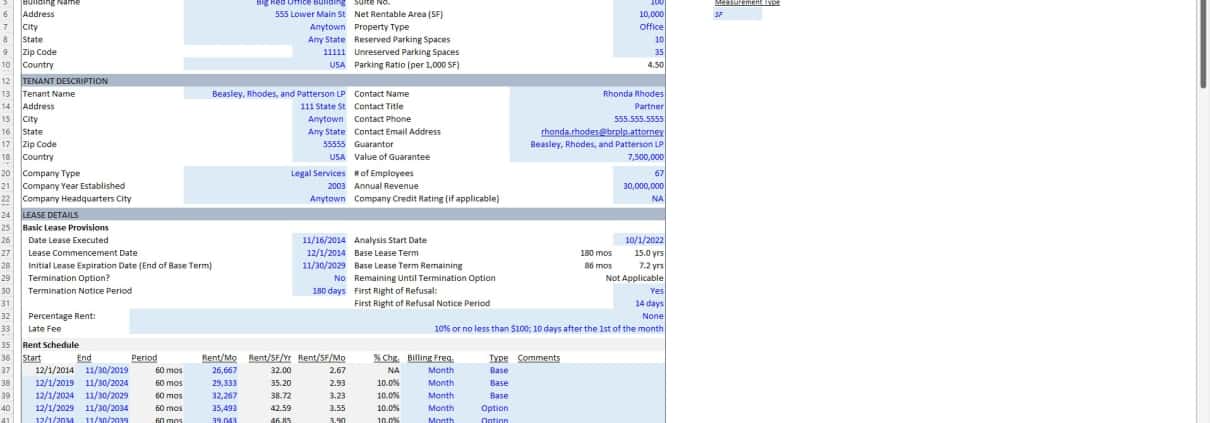
The meat of this tool is the ‘Lease Abstract’ tab. It is here where the details about the lease are entered, and from which the cash flows are calculated.

Lease CF Tab

Once you’ve completed the Lease Abstract, the monthly (and annual) cash flows related to the lease are automatically calculated. Those cash flows include:

  • Annual Cash Flow (Base Term + Options)
  • Annual Cash Flow (Base Term Only)
  • Landlord Cash Flow and Analysis (Base Term Only)
  • Tenant Cash Flow and Analysis (Base Term Only)
  • Cash Flow Annualized (Base Term Only)
  • Monthly Cash Flow (Base Term + Options)
  • Monthly Cash Flow (Base Term Only)

The monthly cash flows are calculated first, and then are rolled up into annual periods. Therefore, if you have a specific question about the cash flows it’s always helpful to first go to the monthly cash flows.
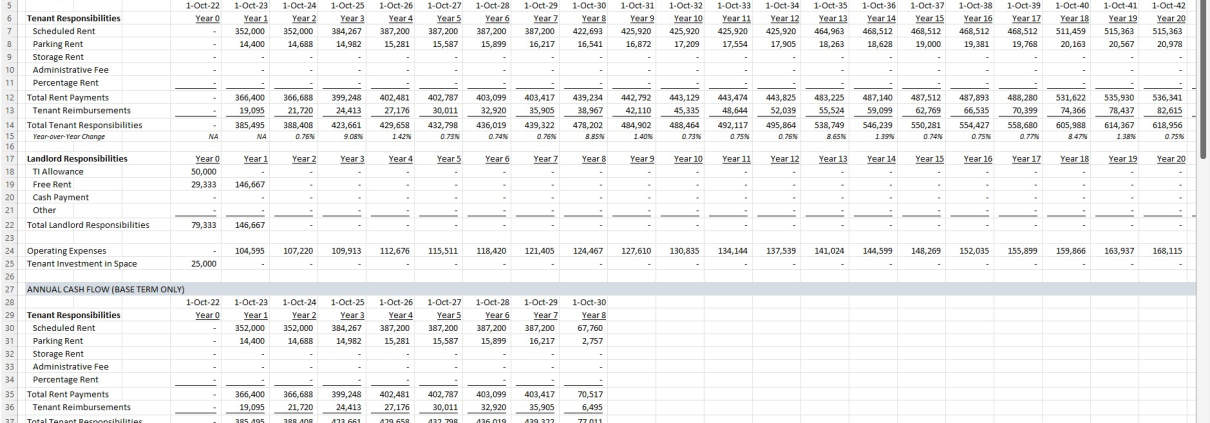
Cash flows from the tenant and landlord perspective are calculated on the Lease CF tab, using the inputs entered on the Lease Abstract tab.

Summary Tab
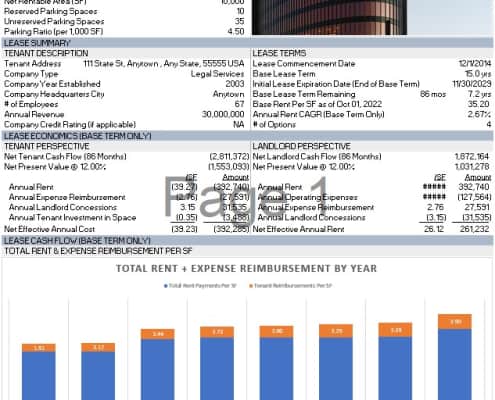
A summary of the lease abstract and lease cash flows are shown on the Summary tab.

With the lease-specific inputs entered on the Lease Abstract tab, and the cash flows calculated on the Lease CF tab, a summary of both are visualized on the Summary tab. The Summary tab includes:

  • Property Description
  • Property Image
  • Lease Summary
    • Lease Description
    • Lease Terms
  • Lease Economics (Base Term Only)
    • Tenant Perspective
    • Landlord Perspective
  • Lease Cash Flow (Base Term Only) visualized in a dynamic column chart

The Summary tab is built to be printable, as is the Lease Abstract tab. Again, you can learn more about that in the walkthrough video below.

Video Walkthrough – Using the Commercial Real Estate Lease Analysis Tool

In addition to the written guidance above, I’ve put together a video that walks you through the various sections of the model. Note that this video is based on beta v0.1 of the model.

Download the Commercial Real Estate Lease Analysis Tool

To make this model accessible to everyone, it is offered on a “Pay What You’re Able” basis with no minimum (enter $0 if you’d like) or maximum (your support helps keep the content coming – typical real estate analysis tools sell for $100 – $300+ per license). Just enter a price together with an email address to send the download link to, and then click ‘Continue’. If you have any questions about our “Pay What You’re Able” program or why we offer our models on this basis, please reach out to either Mike or Spencer.

We regularly update the model (see version notes). Paid contributors to the model receive a new download link via email each time the model is updated.

Proceed to Download Page

Frequently Asked Questions about the Commercial Real Estate Lease Analysis Tool

What is the Commercial Real Estate Lease Analysis Tool used for?

The tool helps analyze commercial real estate leases from both landlord and tenant perspectives. It allows users to forecast lease-related cash flows, compare lease economics, and evaluate lease terms using an institutional-quality lease abstract.

Who should use this tool?

This tool is useful for:

Tenant rep brokers forecasting tenant lease cash flows

Buyers assessing economics of existing leases

Tenants comparing different lease proposals

Landlords analyzing lease performance from a cash flow standpoint

What are the main worksheets in the model?

The model consists of:

Lease Abstract: Where inputs about lease terms and space are entered

Lease CF: Where monthly and annual cash flows are calculated

Summary: Where lease and cash flow summaries are visualized
Two additional tabs support the primary workflow.

What inputs are required on the Lease Abstract tab?

Inputs include:

Rentable space and tenant info

Lease start/end dates, rent schedule, expense responsibilities

Insurance requirements

Tenant inducements and investments

Comments and preparer details
These inputs drive all cash flow projections in the model.

What outputs does the Lease CF tab provide?

The Lease CF tab calculates:

Monthly and annual cash flows (Base Term + Options or Base Term only)

Landlord and tenant-specific cash flow views

Annualized summaries of financial performance
These are auto-generated once the Lease Abstract tab is completed.

How is the Summary tab used?

The Summary tab visualizes lease details and financial performance:

Includes property and lease descriptions

Breaks down lease economics

Provides landlord and tenant perspectives

Displays lease cash flows in a dynamic column chart
This tab is built to be print-ready for presentations or reporting.

Is the model customizable for different lease structures?

Yes. The model accommodates:

Tenant inducements and investments

Custom rent schedules and expense pass-throughs

Override options like lease start date (v0.4 update)
Future versions may include even more customization based on user feedback.

How can I learn to use the model effectively?

A video walkthrough is provided that explains:

The purpose of each tab

How to input lease terms correctly

How cash flows are calculated

How to interpret the summary outputs
This video is based on beta v0.1 and is linked in the post.

How is the model distributed and updated?

The model is offered on a “Pay What You’re Able” basis with no minimum or maximum. Paid contributors receive:

Download links via email

Future updates of the model
Updates are tracked in the Version Notes section of the original post.


Version Notes

v0.5

  • Misc. updates to placeholder values
  • Misc. formatting updates

v0.4

  • Added Lease Start override (Lease Abstract – L26) that forces analysis start date (and lease cash flows) to better align with the lease start day of the month
  • Modified Analysis Start input to only be Month/Year
  • Updated date header in Lease CF tab to be ‘Period Ending’
  • Fixed Time 0 date to be one day prior to lease start

v0.3

  • Removed beta tag
  • Misc. updates to placeholder values
  • Misc. formatting updates

Beta v0.2

  • Expanded size of ‘Tenant Name’ input on Lease Abstract
  • Changed ‘Concessions Due’ heading to ‘Tenant Inducements Due’ heading to more accurately represent the inputs
  • Removed the ‘Per SF/M2’ from the ‘Net Effective Annual Rent’ label on the Lease Abstract
  • Fixed issue where ‘Years’ wasn’t appearing on the column chart on the Summary tab
  • Increased the vertical size of the Summary tab
  • Misc. formatting fixes/improvements

Beta v0.1

  • Initial release

About the Author: Spencer Burton is Co-Founder and CEO of CRE Agents, an AI-powered platform training digital coworkers for commercial real estate. He has 20+ years of CRE experience and has underwritten over $30 billion in real estate across top institutional firms.

Spencer also co-founded Adventures in CRE, served as President at Stablewood, and holds a BS in International Affairs from Florida State University and a Masters in Real Estate Finance from Cornell University.

Contact Spencer
by Spencer Burton
Share this entry
  • Share on X
  • Share on LinkedIn
  • Share by Mail
  • Link to Instagram
  • Link to Youtube
https://www.adventuresincre.com/wp-content/uploads/2022/10/office-building-for-lease-scaled.jpg 1277 1920 Spencer Burton https://adventuresincre.com/wp-content/uploads/2022/04/logo-transparent-black-e1649023554691.png Spencer Burton2026-02-23 14:00:202026-02-23 17:03:56Commercial Real Estate Lease Analysis Tool (Updated Feb 2026)
You might also like
Publicly Traded Tenant Analysis Tool (Updated May 2022)
Case Study #3 – Just the Facts – Retail Sale-Leaseback – Case Only (Updated May 2024)
All You Need to Know About Real Estate Gross-Ups
Watch Me Build – Modeling a Rent Schedule in Both Excel and Using AI (Updated May 2024)
Understanding Leases: Office Buildings – Part 2a
Retail Anchor Tenant Lease Agreement
Accelerator - Learn More

Featured Content

  • RE Financial Modeling Training
  • Library of Excel Models
  • Post a Job – It’s Free
  • Master Financial Modeling
  • Technical Interview Guide
  • Definitive Guide to Excel
A.CRE Library of Excel Models

Recent Posts

  • A.CRE Real Estate Financial Models Download Guide (Updated Jun 2026)
  • Episodio 3 de Multiplicadores: La Brecha de la IA Ya Está Aquí
  • Nuevo Contenido en Español (Actualizado Junio 2026)
  • An AI Skill for the A.CRE Short-Term Rental Acquisition Model
  • Short-Term Rental Acquisition Model (Updated June 2026)

Note About Models

Models downloaded from A.CRE may contain errors. Verify formulas/methodology before basing investment decisions on any model here. Read our Terms and Conditions of Use and Disclaimer.

★★★★★

Accelerator Reviews

Search Adventures in CRE

Search Search

Have a Question or Need Help?

Visit our Help Section

Contact Adventures in CRE

  • Visit A.CRE Help
  • Via Email
  • Via LinkedIn

You Might Also Like

  • Real Estate Modeling Courses
  • Real Estate Financial Modeling
  • A.CRE Job Board
  • Careers in Commercial Real Estate
  • Real Estate Education

A.CRE Library of Excel Models

  • Browse Excel Models
  • Login/Register
  • View My Downloads
  • Edit Account Details

Terms, Policies, and Disclaimer

  • Privacy Policy
  • Cookie Policy
  • AI Usage Policy
  • Terms of Use
  • Disclaimer
© 2014 - Present - Copyright - www.AdventuresinCRE.com, LLC | Adventures in CRE | A.CRE
  • Link to Facebook
  • Link to Youtube
  • Link to LinkedIn
  • Link to X
  • Link to Tiktok
  • Link to Instagram
Link to: New Web App: Short-term Rentals Acquisition Model Link to: New Web App: Short-term Rentals Acquisition Model New Web App: Short-term Rentals Acquisition Model Link to: Student Housing Acquisition Model (Updated Feb 2026) Link to: Student Housing Acquisition Model (Updated Feb 2026) Student Housing Acquisition Model (Updated Feb 2026)
Scroll to top Scroll to top Scroll to top